
AI in construction: where it helps and where it doesn’t
A practical guide for UK contractors, quantity surveyors and estimators: which construction tasks AI handles well today, where it still needs a professional, and how to test it on your own drawings before you buy anything.
Construction AI today
Where AI helps in construction today
The most useful construction AI works on documents the industry already produces: drawings, schedules, tender packs, specifications and project records. Each job below produces a draft a person can check, which is what makes it usable on live work.
For a wider view of the industry, the RICS artificial intelligence in construction report is a good primary source.
- Quantity takeoff and BOQ preparation
- Reading PDF drawings and schedules to propose rooms, dimensions and measurable items, then organising them into a bill of quantities an estimator can check. This is where AI for construction is most concrete today, because the input is a document and the output can be reviewed line by line.
- Tender and specification review
- Summarising tender packs, pulling out exclusions, programme dates and specification requirements, and flagging clauses that need a person’s attention. The useful output is a list with page references, not a confident paragraph.
- Searching project records
- Finding the RFI, meeting minute or drawing revision that answers a question, across shared drives and document management systems. Retrieval with source links helps teams reuse what they already know.
- Progress, site and safety data
- Sorting site photos, daily reports and inspection notes, and drafting progress summaries. These workflows depend heavily on how consistently data is captured on site, so they usually come after document workflows.
AI for construction estimating
A working example: from drawings to a bill of quantities
AutoBOQ is our prototype for turning architectural PDF drawings into a reviewable quantity structure. It proposes the measurable items and keeps each one tied to where it was measured, so the estimator can check it rather than retype it. It is deliberately narrower than autonomous estimating.
Elevations, ground floor plan and section A-A
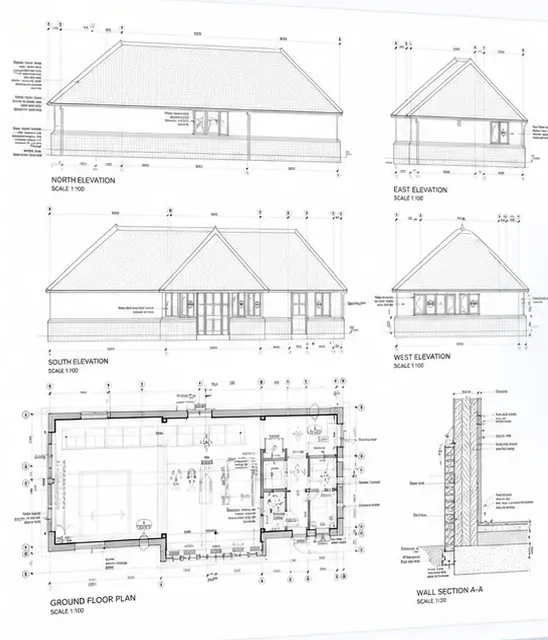
Drawing set and quantities from AutoBOQ’s tool page. Highlights mark where each quantity is measured.
- Windows6 nrBBP0720_362
- External doors1 nrBBP0720_362
- Internal walls40.34 m²BBP0720_230
- Internal doors4 nrBBP0720_230
- Ground floor40.34 m²BBP0720_360
AutoBOQ’s drawing set and the quantities it produced. Hover over or tap any row to see where it was measured. The demo pauses while you read.
Artificial intelligence in construction
What construction AI still can’t do on its own
Drawing conventions, scan quality, scale information and revision status vary from one set to the next.
A detected object is not automatically a correctly measured BOQ item; measurement rules still apply.
Rates and pricing need their own maintained commercial context, which a drawing does not contain.
Professional review remains necessary before quantities affect procurement, cost or contractual decisions.
How to start
How to test AI in a construction business
Start small and measure. These steps work whether you buy a tool or have one built.
- 01
Pick one recurring document job
Choose work that happens often and has a reviewable output, such as takeoff from a drawing family or a tender summary. Avoid starting with decisions that carry contractual risk.
- 02
Collect awkward examples
Gather normal, difficult and poor-quality examples: scanned sheets, revised drawings, missing scales. A tool that only works on a clean demonstration drawing will not survive a live tender.
- 03
Define what correct looks like
Agree the measurement rules, units, work sections and level of detail before testing, so results can be checked rather than admired.
- 04
Test against today's baseline
Compare the AI-assisted output with the current process for completeness, review time and corrections. Record what needed manual repair.
- 05
Decide to scale, revise or stop
Use the evidence to make an explicit decision. A narrow workflow that works is worth more than a broad platform that nobody trusts.
AI in construction: common questions
How is AI used in construction today?
Most practical uses are document work: quantity takeoff and BOQ preparation from drawings, tender and specification review, searching project records, and summarising site and progress reports. Each produces a draft that a professional checks.
Can AI do quantity takeoff from PDF drawings?
It can propose rooms, dimensions and measurable items from suitable drawings and organise them into a BOQ for review. Results depend on drawing quality, scale and revisions, and an estimator still checks the quantities. AutoBOQ is our working prototype of this workflow.
Will AI replace quantity surveyors and estimators?
No. It changes how long the first pass takes. Measurement judgment, pricing, risk, exclusions and the commercial decision stay with the professional, which is why useful construction AI shows its sources and leaves the final say to a person.
Where should a small contractor start?
With one bottleneck rather than a platform. If measurement from drawings is slow, test takeoff first; if rates and supplier quotes cause delay, fix the commercial data. Our construction estimating software guide compares the options.
What does a construction AI project involve?
A first version is usually one workflow, built on a defined drawing set with agreed measurement rules and an evaluation sample. Our 28-day sprint ends with a working product on your own documents and the source code.