
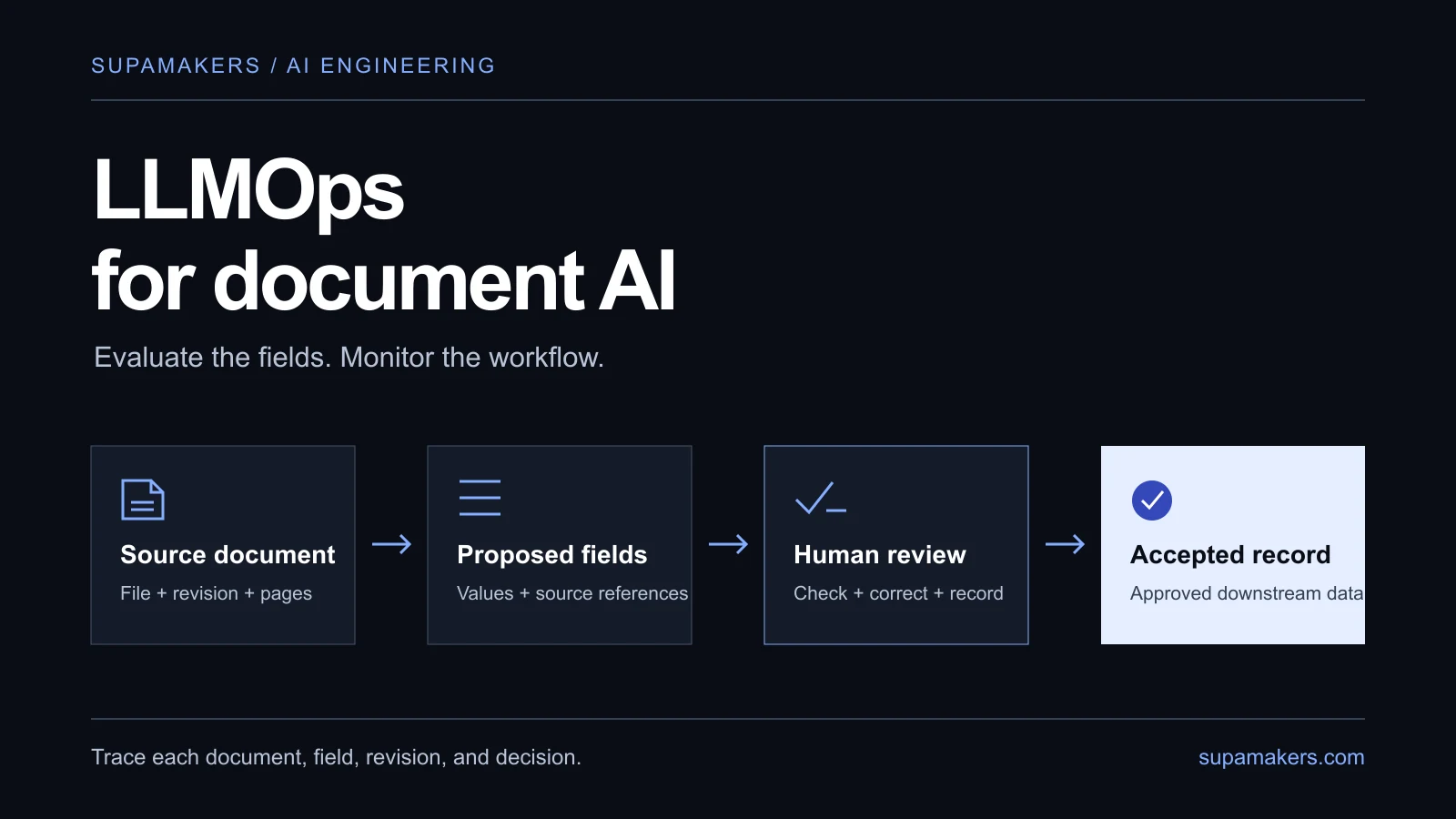
An invoice workflow returns valid JSON, finishes quickly, and reports no API errors. The gross amount is still wrong. An uptime dashboard will show a healthy system while a reviewer fixes its work.
LLMOps is the practice of evaluating, releasing, monitoring, and improving applications built around large language models. For document AI, it connects each extracted value to its source, reviewer decision, and pipeline version.
This guide uses three original synthetic invoices with deliberately flawed proposals. It demonstrates evaluation mechanics, not a model benchmark or a SupaMakers customer result.
What you will learn
- Measure correct fields and supporting evidence separately.
- Track the changes that can alter an extraction.
- Turn reviewer feedback into monitoring and release decisions.
What changes when MLOps becomes LLMOps?
MLOps brings testing, deployment discipline, and monitoring to machine learning. Google's MLOps pipeline guide focuses principally on predictive AI: training data, feature engineering, training, and serving.
An API-based document application often uses an existing model. Its answer also depends on the parser, prompt, output schema, source context, and validation rules. An OCR update can change the result even when the model stays the same.
Google's generative AI operations guidance extends the lifecycle to prompts, model versions, application chains, and their inputs and outputs. Start by evaluating that complete application. A training pipeline becomes relevant if you choose to train or fine-tune a model.
Define the accepted document workflow
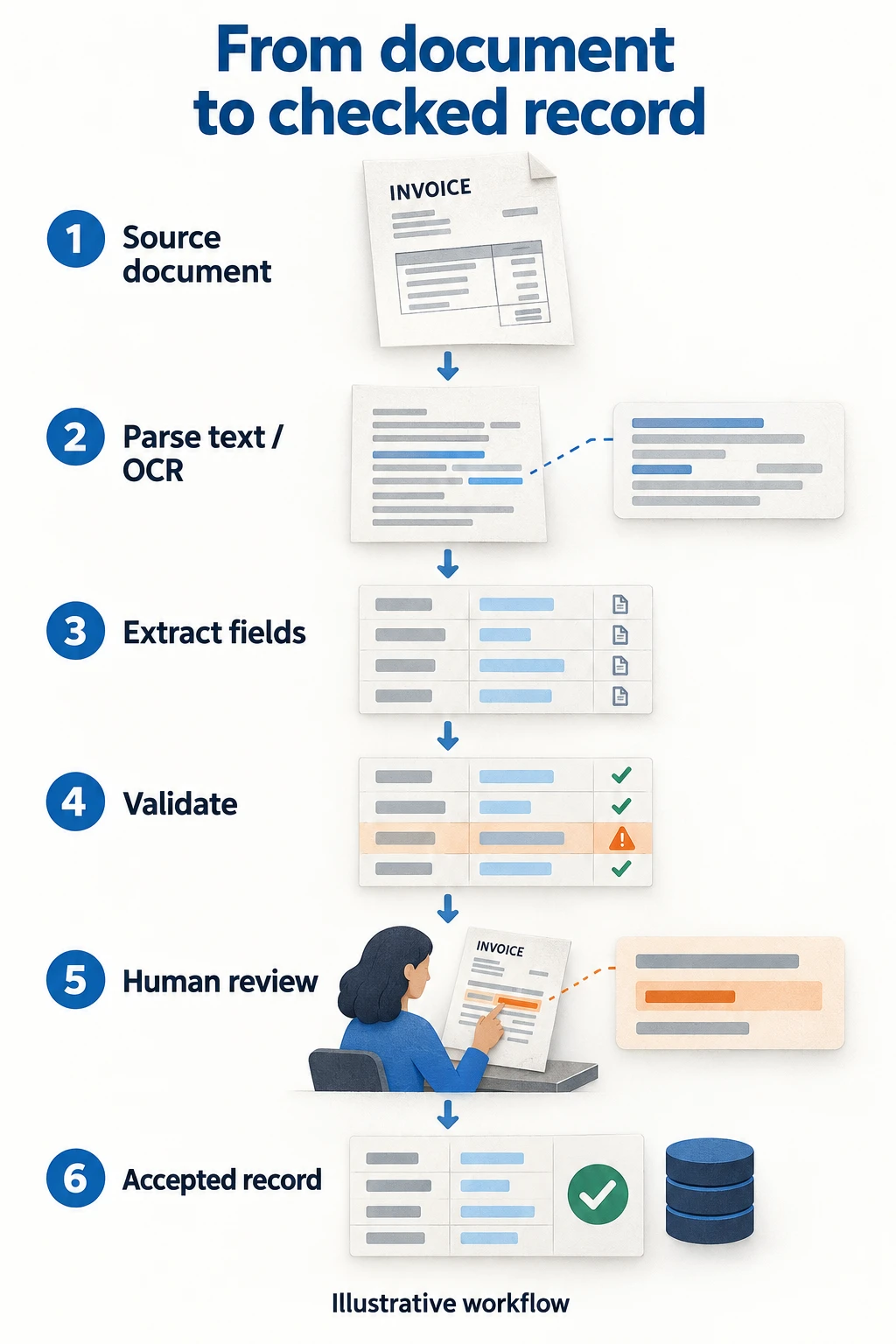
Keep the extraction proposal and accepted record separately so corrections do not erase the original failure.
Each example invoice requires six fields: supplier, invoice number, invoice date, currency, net amount, and gross amount. Every field should point to supporting source evidence. Here, acceptance means the record was reviewed against the invoice; it does not authorise payment.
Fixed steps make this workflow inspectable. If an agent later chooses tools or resolves missing context, evaluate those decisions too. Anthropic's agent design guidance recommends the simplest adequate approach. Our production agent workflow guide covers state, escalation, and recovery.
Build an evaluation set with inspectable answers
A reviewer should establish each reference value and its source location. Clarify the field definition first: does “total” mean net, tax-inclusive gross, or outstanding balance?
Write comparison rules before evaluating versions:
- Names and identifiers: specify case and whitespace handling; preserve meaningful punctuation and leading zeroes. Do not silently merge different legal entities.
- Dates: agree a representation, reject impossible dates, and route ambiguous ones to review.
- Amounts: compare decimals in the declared currency.
500.0and500.00can be equivalent;500.00and508.00cannot. - Missing values: keep missing, null, and malformed required fields in the denominator as failures. Label explicitly when absence is allowed.
Include routine documents alongside awkward scans, unfamiliar layouts, multiple currencies, credit notes, and revisions. Track those groups separately. Keep a held-out set for release decisions; repeatedly tuning on the same cases does not establish generalisation.
Three invoices, three value errors
The evaluation kit includes numbered source lines, reference answers, proposals, and simulated reviewed outputs. The proposals were authored with intentional errors; no extraction model was called.
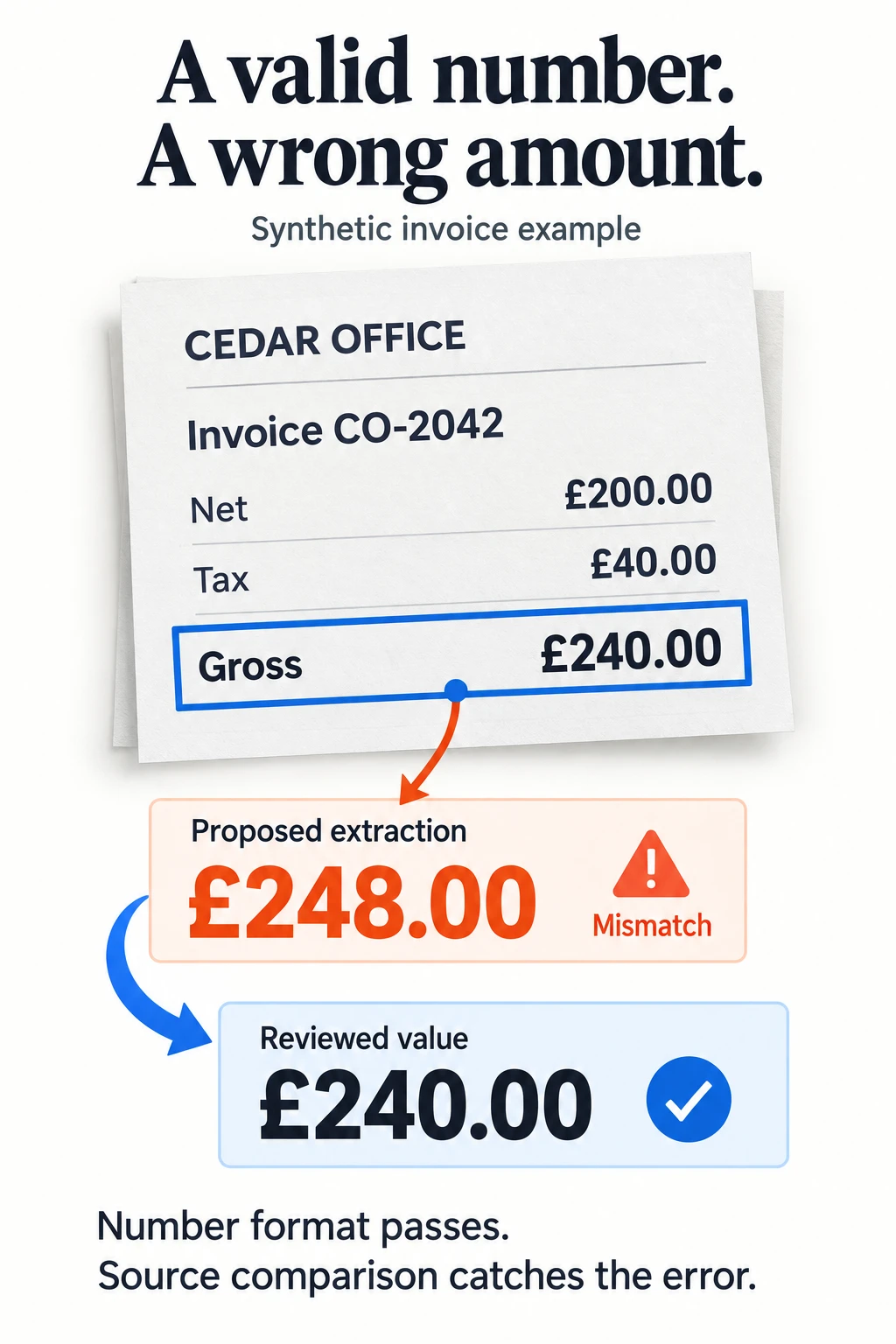
Cedar's proposed amount is a valid number. Only a source comparison reveals the error.
| Invoice | Proposed error | Required correction |
|---|---|---|
| Northline Supplies | Date 2026-09-31; supplier citation points to the invoice number |
Date 2026-09-13; correct supplier evidence |
| Cedar Office | Gross amount 248.00 |
Gross amount 240.00 |
| Harbor Tools | Net amount omitted | Net amount 500.00 |
All three proposals are parseable JSON. Schema and field checks should catch missing fields and invalid dates. Plausible but incorrect amounts still require a source check.
Extract the ZIP and run:
python3 evaluate.py
Required-field correctness is 15 / (3 invoices × 6 fields) = 15/18, or 83.33%. Monetary fields score 4/6, or 66.67%. The overall average conceals errors in the fields that would matter most downstream.
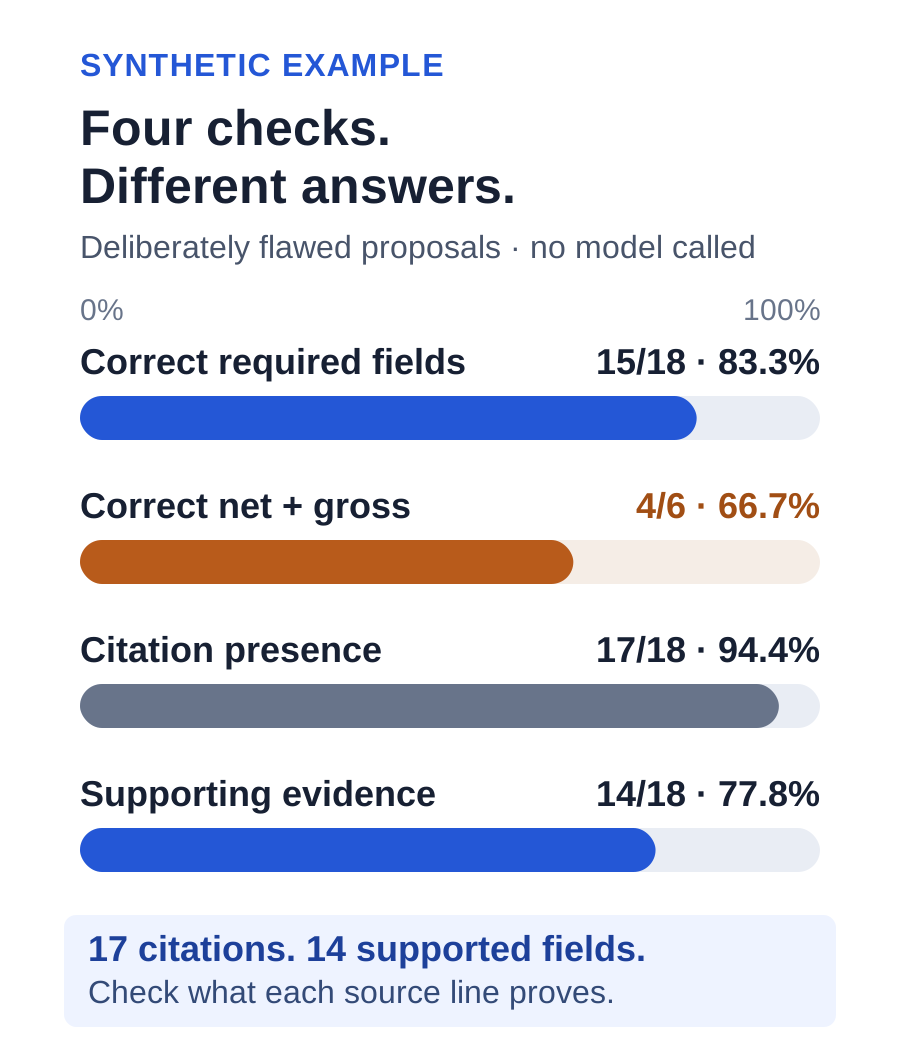
These scores describe the deliberately flawed fixtures, not measured model performance.
A citation can exist without supporting the answer
17/18 slots have citations, all pointing to existing source lines. Only 14/18 have evidence supporting the proposed value. Northline's supplier citation points to the wrong field; the date and gross errors are unsupported; the missing net amount has no citation.
The scorer checks the labelled field location and normalised source value. That narrow rule fits these fixtures. Production PDFs may require bounding boxes, multiple passages, or human assessment.
Simulated review repairs three values and the misplaced citation, producing 18/18 on values and evidence. This shows the effect of the supplied corrections, not model improvement or future reliability. Three synthetic invoices cannot establish production performance.
Version everything that can change the answer
A run record should connect the document ID, revision, and file hash to the application release and versions of its parser, prompt, schema, model, validation rules, and evaluation set. Include retrieval settings and source revisions where relevant.
Link that record to proposed values, failed checks, reviewer decisions, and downstream write status. Store the prompt's actual configuration, including examples and generation settings. A moving model alias can limit reproducibility, so capture the provider's model identifier.
MLflow's prompt evaluation documentation demonstrates linking prompts, models, datasets, evaluations, and traces. Ordinary application storage can also hold this history. Choose tooling that helps your team compare runs and investigate failures.
Monitor quality alongside latency and cost
Live documents usually lack reference answers. Obtain labels through reviewed records and sampled audits, and report their coverage. An unlabelled output stream cannot tell you its true extraction accuracy.
| Signal | What to measure |
|---|---|
| Field correctness | Correct labelled values / all required labelled slots. Include missing and malformed fields; separate critical fields. |
| Evidence support | Supported values / evaluated required slots. Track citation presence separately. |
| Reviewer corrections | Changed fields / reviewed slots, grouped by reason. An edit may reflect ambiguity or formatting, not an extraction error. |
| Acceptance without edits | Reviewed documents accepted unchanged / all reviewed documents. Pair with audits; reviewers can overlook errors. |
| Completion and backlog | Accepted documents / submitted documents, plus pending work, queue age, and reviewer minutes. Deduplicate retries. |
| Latency and cost | Receipt-to-acceptance time; processing spend including failed attempts and retries / accepted documents. Separate review time and labour. |
Inspect slow latency percentiles as well as averages. If no documents are accepted, cost per accepted document is undefined.
The downloadable monitoring scorecard records coverage, owner, threshold, and action. It is a template, not measured production data.
Segment before trusting an average
Compare results by document family, supplier layout, language, scan quality, currency, and pipeline version. Easy digital invoices can conceal failures in a smaller stream of scans.
Show reviewed-document and field counts for each segment. Small samples are unstable; compare like-for-like groups before attributing changes to a prompt or model. Unfamiliar layouts or longer documents should trigger investigation and targeted sampling. They do not alone prove declining quality or justify retraining.
Give each alert an owner and a response
Agree policies with the workflow owner. Useful starting responses include:
- Missing or unsupported monetary field: retain the proposal and route the record to review.
- Known monetary regression in release tests: block the release until resolved or explicitly narrow its supported scope.
- Rising audited errors in one layout: inspect source and parser changes, increase review, and pause automatic export if needed.
- Retry surge or overdue review queue: bound retries, retain manual recovery, and notify the operations owner.
These are proposed policies, not universal accuracy targets. The example scorer implements fixture evaluation, not production alerting or payment controls. Use controlled document references and appropriate retention rather than unrestricted document logs.
Make each release comparison reproducible
Before changing a prompt, model, parser, schema, or validation rule:
- Run current and candidate versions against the same frozen evaluation set.
- Compare fields, evidence, critical values, and affected segments. Inspect changed answers.
- Record exceptions and the decision; retain the previous working configuration.
- Use a limited production sample with review before increasing traffic. Repeat runs where model variability matters.
- Monitor audits, review workload, completion, and cost. Restore the previous configuration after a confirmed regression.
A rollback changes subsequent runs; it cannot undo exported records. Use the run history to identify records needing correction. Add confirmed failures and checked answers to regression tests while preserving the original proposals.
Start with one document family
Define its fields, accepted output, and labelled baseline. Preserve proposals and reviewed records, and assign someone to respond when quality or throughput changes.
Download the original evaluation kit to run the scorer. To apply this approach to tenders, drawings, contracts, or invoices, see SupaMakers' data infrastructure and AI operations service or bring one workflow to a conversation.
Learning resources and attribution
Daily Dose of Data Science's MLOps and LLMOps course, particularly evaluation fundamentals and monitoring, informed the background research. The invoices, errors, scoring code, scorecard, and document workflow treatment are original SupaMakers examples. The primary documentation linked throughout adds detail on operations, evaluation, and workflow design.


